Esplora quest’area demo per vivere in prima persona l’innovazione all’avanguardia di Inovamesh® attraverso un'ambiente online di prova reale.
Lo schema della PoC dimostra uno scenario complesso, solitamente difficile da connettere in modo sicuro. I punti chiave evidenziati sono l’accesso sicuro a servizi cloud avanzati (come la videoconferenza) e a sistemi IoT sul campo tramite connettività tradizionale LTE/4G/5G.
Info Ulteriori su Inovamesh®Abbiamo suddiviso la descrizione dell’ambiente Demo PoC di Inovamesh® in diversi passaggi principali. Questo approccio vi consentirà di sperimentare direttamente le funzionalità chiave di Inovamesh® e di accedere a materiali informativi per approfondire ogni argomento.
Tempo di lettura stimato (esclusa la documentazione): 45 minuti.
- Demo & PoC: Una ZTNA realmente Plug & Play, le evidenze.
- Demo & PoC: Punti salienti, funzionalità e evidenze pratiche.
- Il Cloud Manager: Punti salienti, funzionalità e Infrastruttura.
- Documentazione Tecnica: Un'esplorazione approfondita degli aspetti tecnologici.
Questo ambiente demo ha l’obiettivo di rappresentare realisticamente uno scenario di rete mesh in condizioni reali, con dispositivi e servizi server distribuiti sia in ambienti cloud che in sedi IoT remote on-premise. Per questo motivo, i dispositivi e i servizi interconnessi sono già completamente configurati.
In ogni caso, prima di approfondire la PoC, intendiamo offrire un’anteprima dell’immediatezza e della semplicità con cui un cliente Inovamesh può attivare i propri dispositivi ed estendere la rete mesh. In questa sezione, infatti, mettiamo in evidenza le funzionalità Plug&Play dei dispositivi Inovamesh® attraverso una sessione smart in cui verranno attivati un paio di dispositivi.
- Il cliente riceve un dispositivo non configurato dal partner Cyberinova con il solo software preinstallato.
- Il cliente collega la porta WAN del dispositivo alla propria rete LAN, con l’unico requisito che a questo si consenta la navigazione internet.
- Il dispositivo si connette automaticamente al portale Inovamesh Manager e richiede l’attivazione presentando i propri dati identificativi (numero di serie, descrizione, posizione).
- Il partner Cyberinova rileverà automaticamente il nuovo dispositivo nel sistema e ne confermerà l’attivazione nella mesh tramite l’Inovamesh Manager.
- La rete mesh Inovamesh Manager completa l'autoconfigurazione del dispositivo fornendogli le politiche di sicurezza e la visibilità all'interno della mesh.
- Questo è tutto ciò che serve per attivare i dispositivi nella rete mesh.
- Nel caso tipico in cui il dispositivo stesso è il sistema IoT da connettere, non sono necessari passaggi aggiuntivi.
- Simuliamo ora un caso più complesso, in cui il dispositivo funge da gateway e/o proxy per connettere alla rete mesh dispositivi non protetti e non predisposti nativamente.
- Connettiamo, ad esempio, al dispositivo in questione — che dispone sia di porte LAN fisiche che WiFi — dispositivi che lo vedranno come un classico router LAN.
- A questo punto, possiamo verificare, con un semplice messaggio UDP/TCP, come sia possibile connettere dispositivi non protetti nativamente senza apportare alcuna modifica ad essi.
This Proof of Concept showcases the core capabilities of Inovamesh® Zero Trust Network Access (ZTNA) system powered by Software-Defined Networking (SDN). Through practical scenarios, it demonstrates secure, dynamic, and context-aware access across cloud services, remote users, and IoT environments — highlighting the value of a scalable and modern security SaaS based approach.
In this PoC, although limited in scale, we have implemented some of the most complex challenges to solve, such as:
- Simultaneous access to devices across different locations, involving services hosted both in the public cloud (with its native network protection restrictions) and on-site, the latter connected via WAN through LTE/4G/5G Internet Service Provider links.
- Integration of networking-intensive services requiring specific protocols and ports, such as a video conferencing system.
- Simulation of access to legacy services deployed in the public cloud, which are naturally affected by reachability issues due to cloud-native security restrictions on incoming traffic sources.
- Elimination of NAT-related issues and direct reachability constraints for on-site IoT or legacy devices connected via LTE/4G/5G Internet Service Provider networks, which typically lack fixed public IP addresses and instead rely on dynamically assigned IPs.
We will perform the test by operating user access from a workstation preconfigured with the Inovamesh® client installed, which enables navigation within the selected mesh.
We will access the mesh through an online workstation via RDP at the address demo-client.inovamesh.cloud on RDP port 3389. Please contact us to request the login username and password.
If you wish to use your own workstation or laptop, you can prepare it by downloading the setup package of Inovamesh® Windows client and related instructions available at 👉 https://www.Inovamesh.cloud/downloads/vIM_PS_Gen2+Docs.zip
In this scenario, Inovamesh® also solves the reachability problem caused by the discontinuation of fixed IP addresses provisioned by LTE/4G/5G Internet Service Provider. Due to the shortage of public IPv4, the Internet Service Provider now provide SIM NAT with dynamic public IPs only, which makes reverse reachability from the cloud service to the remote device difficult or even impossible.
Demonstration steps:
- Using a laptop with the Inovamesh® client installed, open a browser and navigate to the following addresses: https://192.18.46.235/
- You will see an Axis IP Remote Cam instance, connected to the mesh with an Inovamesh® IoT Hardware Client, without any modification required.
In this PoC, services hosted in the public cloud are interconnected, including two Jitsi video conferencing instances that represent a typical legacy deployment scenario.
These services are published within the mesh using two different approaches:
- By installing the Inovamesh® service directly on the Jitsi server.
- Or by deploying an Inovamesh® gateway appliance within the Jitsi server’s LAN, which publishes the reachable services to the mesh without requiring any modification to the Jitsi server itself.
Demonstration steps:
Using a laptop with the Inovamesh® client installed, open a browser and navigate to the following addresses:
- Jitsi instance with embedded Inovamesh® client: https://192.18.0.18/
- Jitsi instance accessed via Inovamesh® gateway: https://172.31.50.247/
Note: In the second case, you are transparently navigating the internal LAN of the cloud-hosted service. Inovamesh® automatically distributes LAN resources over the mesh for you.
Making services on the internet virtually invisible to connection attempts from sources that are not certified and classified within the mesh is the strongest guarantee of security. This is further enhanced by the classic Zero Trust Network Access (ZTNA) model, where each access attempt is evaluated, authenticated, and authorized based on who you are, where you are, what you want to do, and under which conditions.
By integrating a cloud service into the mesh and distributing it only to other devices within the same mesh, the service can be made available online while firewalling the server and reducing its footprint — effectively making it invisible to any external source, including hackers.
Demonstration and evidence include:
- A vulnerability CVE report produced using Qualys VMDR, an Enterprise-Grade tool for scan and vulnerability assessment, executed on a Jitsi server published in the traditional way on Amazon AWS.
Although the server is based on an up-to-date platform, the report highlights several (46) vulnerabilities. The server is fully exposed to the internet and can only be protected through IP filtering policies, which are inherently bypassable using common spoofing techniques.
You can download this first report at 👉 https://www.Inovamesh.cloud/documents/I-Mesh.Jitsi-Gtw.AWS.Without.Mesh.Scan.pdf
- A second vulnerability and CVE report using Qualys, executed on the same server under identical test conditions, except with the mesh activated.
In this configuration, the service remains fully functional even though all standard internet ports required for Jitsi are closed. The server is now obfuscated, and the same scanning test confirms that it is not detectable anymore ("No Host Alive" return status).
You can download this second report at 👉 https://www.Inovamesh.cloud/documents/I-Mesh.Jitsi-Gtw.AWS.With.Mesh.Scan.pdf>
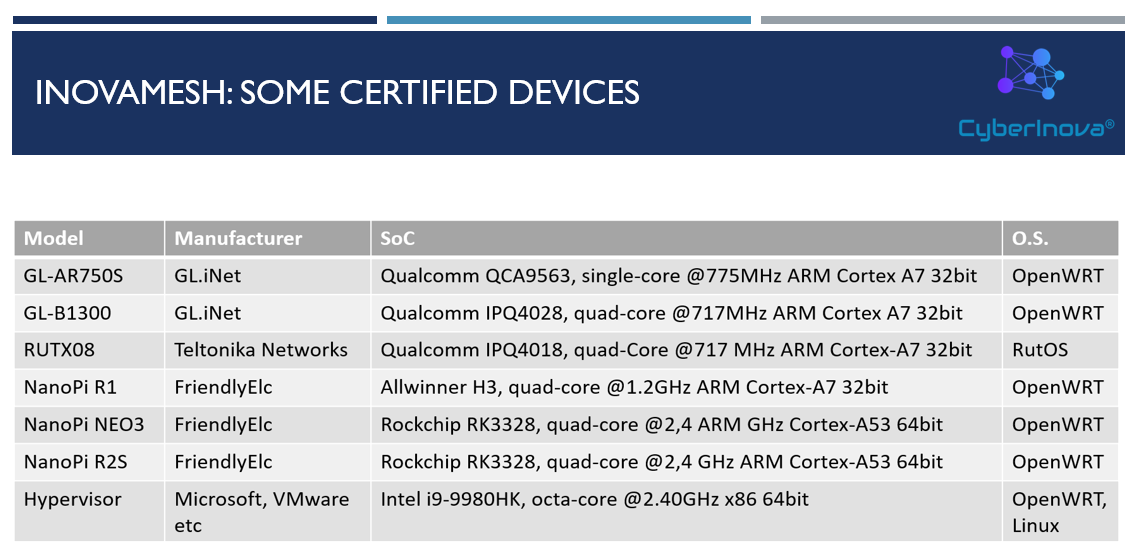
Inovamesh® is available as a multi-platform software client written in the Go language for Linux, Windows, and Micro-Kernel Linux systems. We also develop embedded implementations on industrial hardware and IoT platforms based on OpenWrt and/or Micro-Kernel Linux.
This section highlights the features of the Inovamesh® Manager application — the Cyberinova Ltd solution that enables and manages the Inovamesh® ecosystem in a SaaS-based, multi-customer and multi-mesh environment.
After seeing a mesh in operation, let's now explore how easily it can be managed and configured — without requiring in-depth knowledge of complex networking techniques — thanks to the following features:
- Mesh network and device configuration is entirely rule-based and managed through a centralized repository.
- Native support for managing multiple meshes simultaneously, across multiple clients.
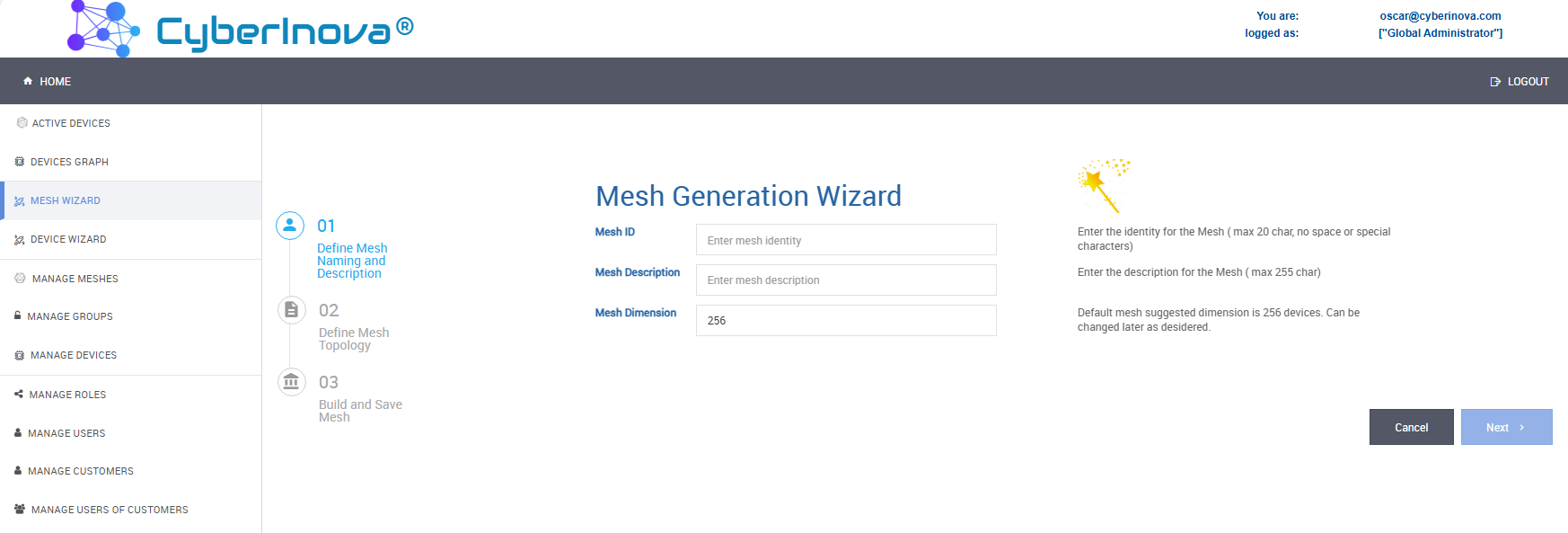
- Simplified configuration interface - no code - for meshes and devices, with guided wizards that handle the complexity of network mapping and the built-in firewall rules.
- Device monitoring with status readings and command execution (e.g., Ping, DNS checks, remote SSH commands).
- Graphical representation of the active mesh and the connections between devices.
- Activity log collection using the EFK stack (Elasticsearch, Fluentd, Kibana).
You can find the Inovamesh® Manager at 👉 https://manager.Inovamesh.cloud/
Inovamesh® Manager is a system based on Amazon AWS with state-of-the-art architecture, performance, and compliance.
The Inovamesh® Manager console is the primary user management application for meshes and devices, featuring simplified user interfaces with role-based permission management operating at the levels of interface functions as well as entities such as customers, meshes, and devices.
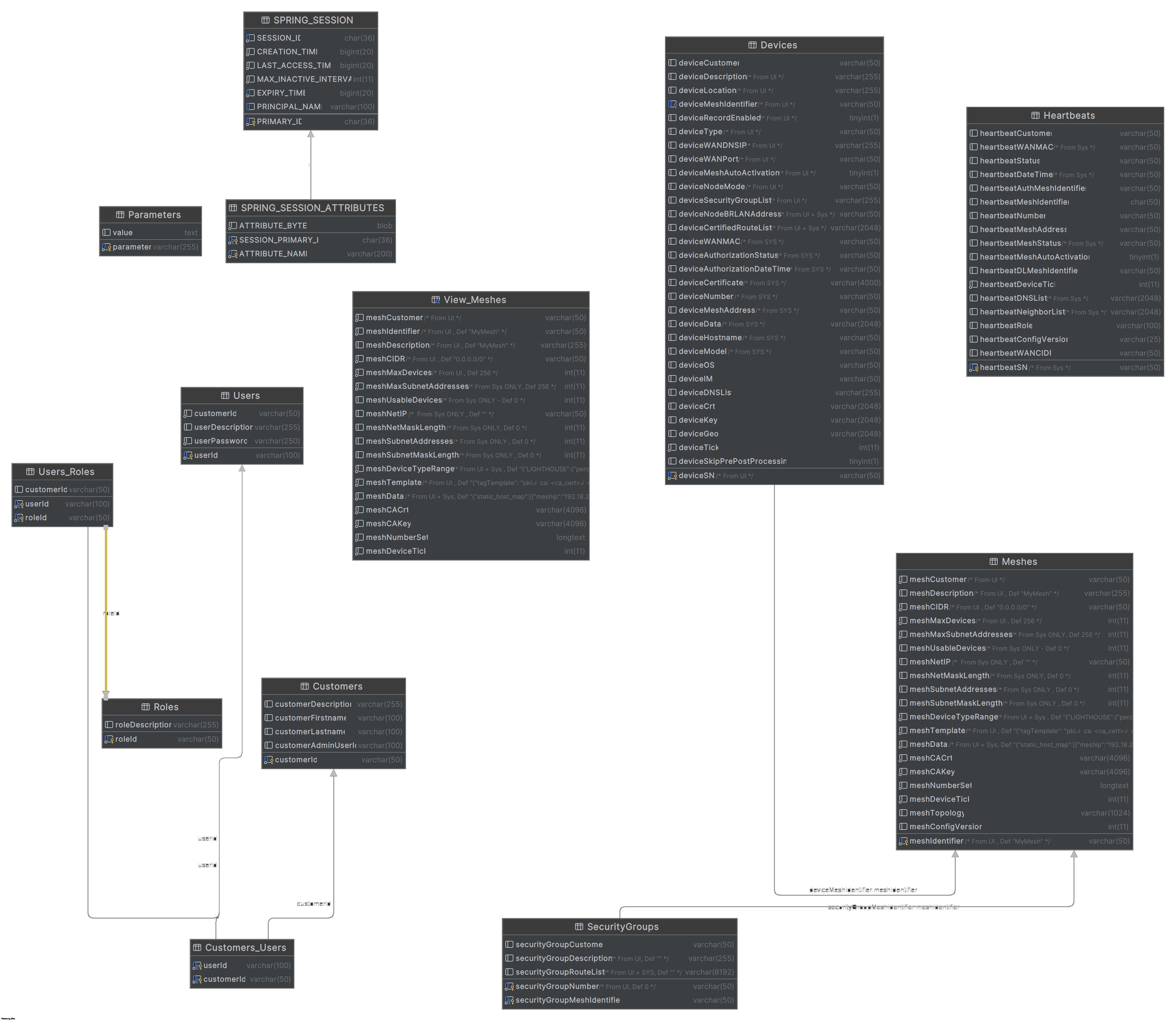
We have virtualized the typical SDN configuration into configuration rules hosted in a centralized repository. The mesh devices receive their configurations via MQTT messaging using AWS IoT Core technology.
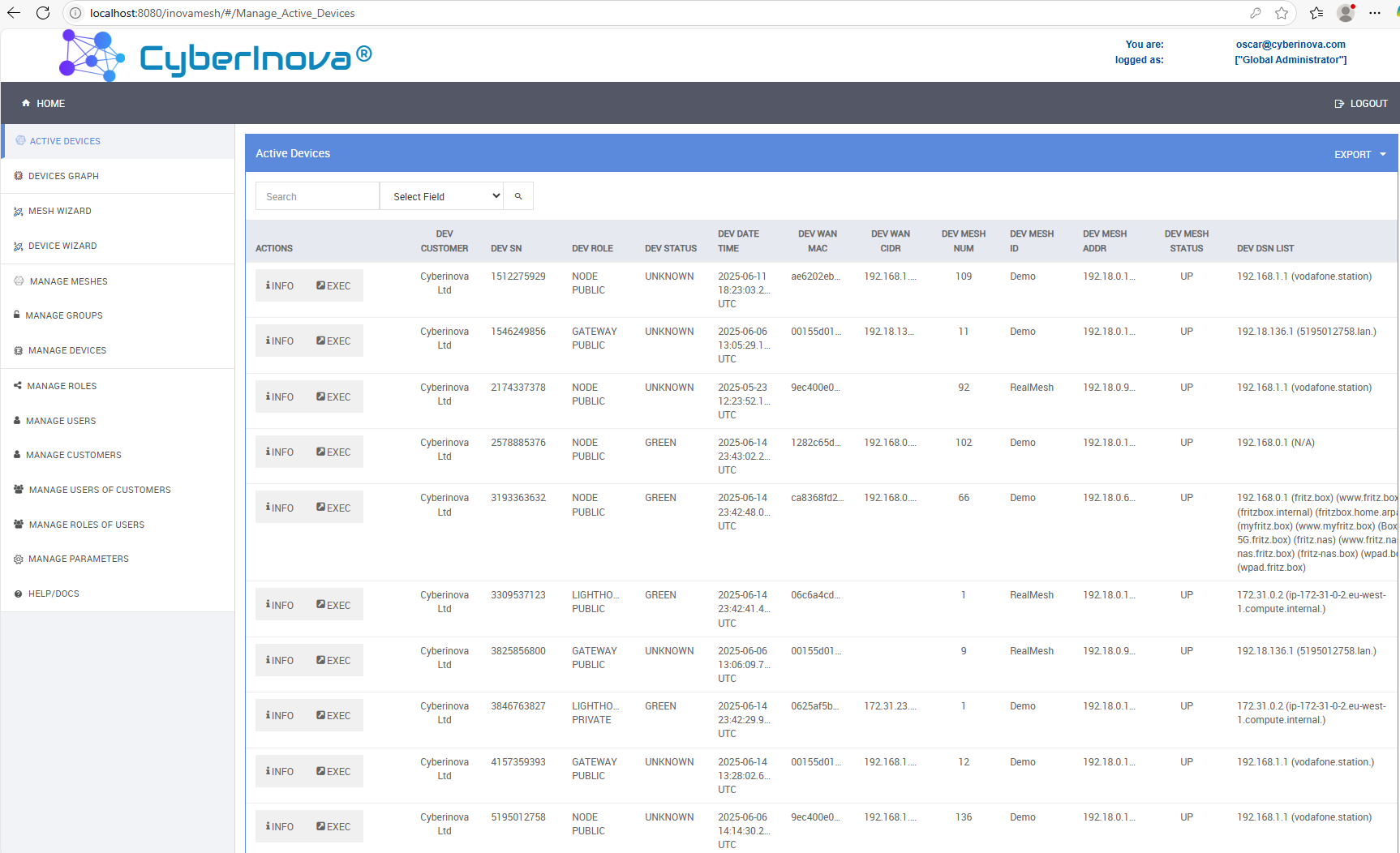
An operational dashboard is available for active devices within the meshes. Through this console, the manager can monitor device status, access identification, location, and condition information. Additionally, the manager can perform a range of remote operations, from a simple PING to a remote shell session, enabling direct activity execution on the device and fully remote management.
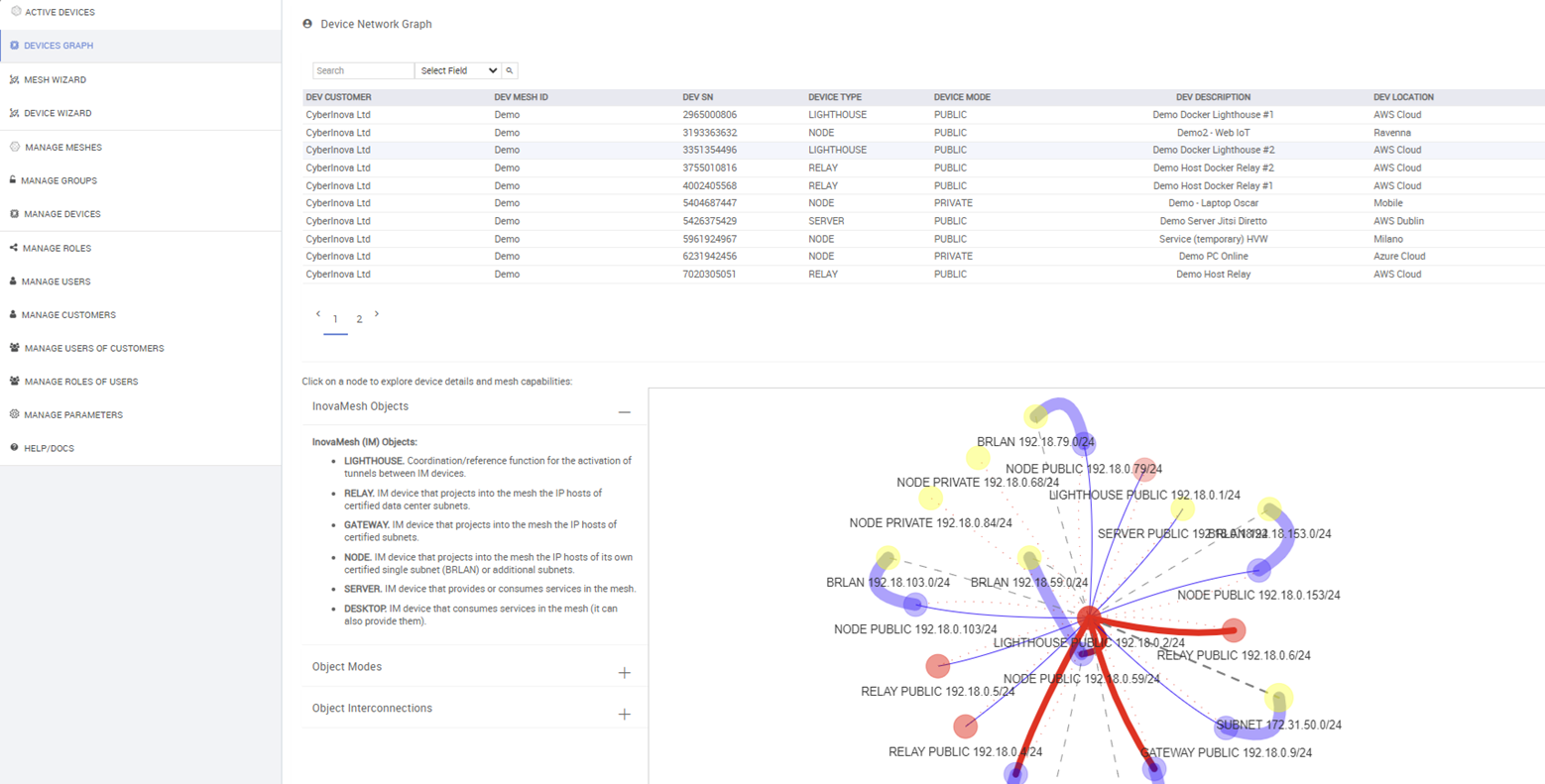
In Inovamesh®, a graphical representation of each device and its relationships with other entities in the mesh is available. This allows for a visual verification of the network configuration achieved through the mesh and device setup interfaces, including guided configurations created by the built-in wizards.
With the built-in wizards in Inovamesh® Manager, you can effortlessly create new meshes, add and configure new devices, and activate them within the mesh — all without requiring in-depth knowledge of complex networking topics. This, combined with the SDN-based virtualization of network configurations, makes the Inovamesh® solution highly efficient and secure, significantly reducing both setup time and the risk of common network configuration errors.
Inovamesh® includes built-in mesh functionalities for collecting operational logs and system events occurring on the devices. The log collector gathers all relevant events and inter-device traffic statistics using the standard syslog format. This enables seamless log transfer and analysis with advanced third-party tools such as EFK. You can view our EFK instance for Inovamesh® at 👉 https://efk.Inovamesh.cloud/. Please contact us to request the login username and password.
If you still have time, you can download in-depth documentation on Inovamesh® covering technical details, topology examples, and more — providing a complete understanding of its features and distinctive aspects
Extended presentation for the current Inovamesh® 2.0 version, now a cloud SaaS solution for agile security management.
👉 Download the extended description to Inovamesh 2.0 - ZTNA Made Simple!
Here you can download some in-depth documents on Inovamesh® for technical information, topology example and more.
👉 Download the introduction to Inovamesh® concepts.
👉 Download the extended description to Inovamesh® concepts and architectures.
👉 Download the Inovamesh® White Paper with topologies and use case example.